Procedure window
The procedure windows in Monitor ERP are standalone tabs. You can place them anywhere you want on your screen. If you have more than one screen you can also move the procedure windows (the tabs) between the screens. The procedure windows are adapted for a screen resolution of at least 1280 × 720 pixels (HD).
The procedure windows always contain the following parts: Settings (1) with different general alternatives and settings for the procedure, Toolbar (2), Title bar (3), Boxes (4) with different contents. A function menu (5) is available in certain boxes. Some procedure windows are also divided into several tabs (6).
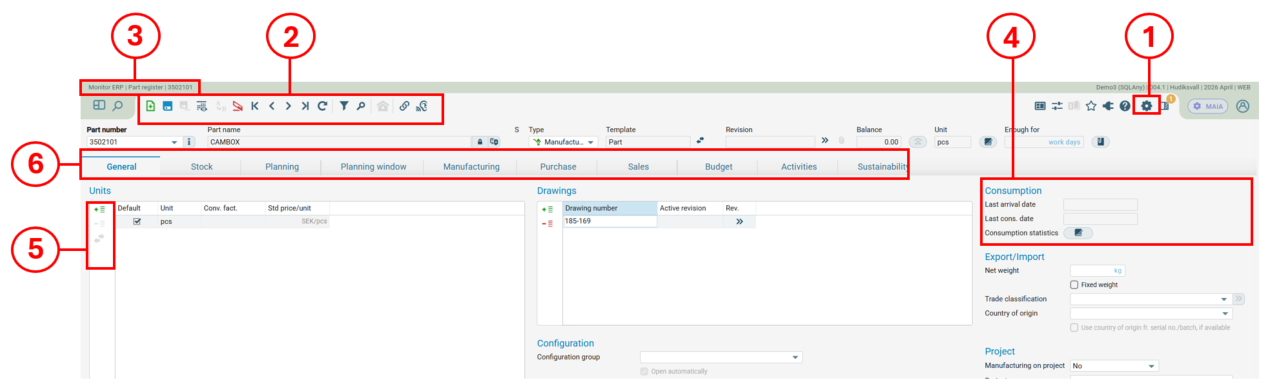
There are principally three different types of procedure windows in Monitor ERP, single-record procedures, list procedures, and table procedures.
Please note! This function is not applicable in the Daily management and customized reports.
 Single-record procedures
Single-record procedures are used to register and update one data record at a time. These are data records which contain a lot of information, for example parts, customers, and customer orders. The procedure windows also contains the following sections:

List procedures/Printout procedures
List procedures are used to select and load several data records to different list for printing and reporting. The procedure windows contain the following sections: List types (1), Presentations (2), Selection rows (3), Settings (4). A list is shown in the List tab, which has a Grouping header (5). Some of the lists also have a side panel.


Printout procedures are a type of list procedure. The procedure window contains the same parts – List types (1), Selection rows (3), and Settings (4) – as the Selection tab, as shown above. Printout procedures do not have a tab called List, or a side panel. Instead they have the Documents tab, which contains the following: Settings (6), Result (7), and Preview (8).

Table procedures
Table procedures are used to register different basic data in a table, for example terms, codes, price lists, and categories. Procedure windows of this type contains one or several tables (1) divided in different tabs.

Subordinate windows
There are also subordinate windows to many procedure windows in Monitor ERP. Read more about subordinate windows.