FAQ – BOM and routing
 I have made changes in a BOM and routing. How can I update manufacturing orders already created for the part?
In the Synchronize with BOM and routing procedure you can compare manufacturing orders with BOM and routing and then synchronize. If the BOM and routing has been modified and you want to update the manufacturing orders for that part, this can be done as long as these orders have status 1-3. It is possible to synchronize operations which are not started even if other operations for the part are started or reported.
How do I replace material in multiple BOM and routings at once?
Go to the Material list procedure and choose which part you want to replace. You must also ensure that the list is updatable.
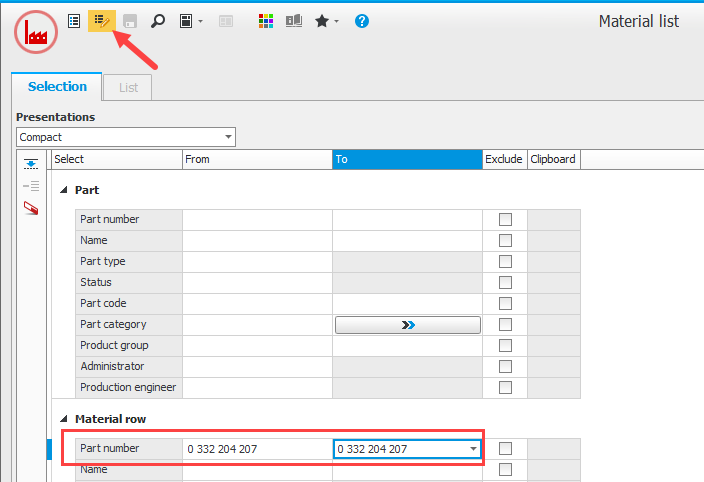
The Material list procedure, in updatable mode.
Click Find & replace in the function menu to the left of the list. Here you are able to choose which part you want to replace the material with.
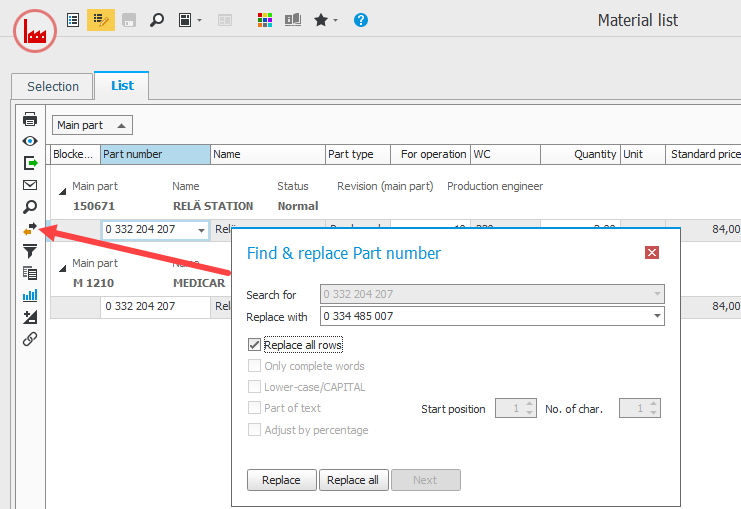
Find & replace in the Material list procedure.
How do I replace an operation in several BOM and routings at once?
This is done in the same way as when you replace material (see above), but you use the Operation list instead.