Releasing and invoicing of advances
You can release an advance invoice basis in the following ways:
- Via the Invoicing plan tab in the Register customer order procedure.
- Via the Detailed list type in the Invoicing plan list procedure.
To release the advance invoice via the Invoicing plan tab in the Register customer order procedure, you do the following:
-
Click on the row which you want to release and click the button Release for invoicing. You can also access this command via the context menu (right-clicking).
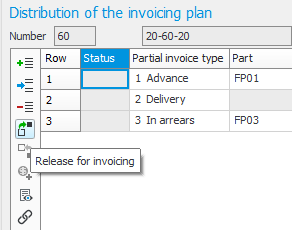
-
An invoice basis is then created (compare with delivery reporting an order row). You can also undo this command (if the basis has not been invoiced yet). This is done by clicking the button Undo release. If he order is partially delivered, you need to undo the release of advance/arrears by using the Undo delivery reporting procedure.
The advance invoice can also contain text information from the customer order such as for example order rows, goods label, etc. This is determined via the setting Invoice text on advance invoice/invoice in arrears on the invoicing plan in the Invoicing plans procedure.
-
When you have released a partial invoice for invoicing, the procedure Register invoice directly will open with this basis loaded. This makes it possible to enter additional information on the invoice.
Under the Header tab in the procedure Register invoice directly, you will see the partial invoice type Advance according to the image below.
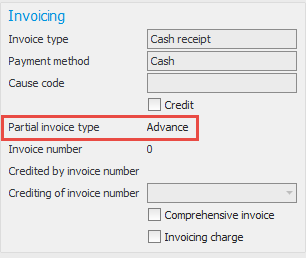
The invoice document will by default have the heading Advance invoice. It is possible to choose which phrase should be used as heading. This is done in the procedure Document texts. Phrase numbers 662–667 are the phrases specifically used for invoicing plans.
The advance invoice can also contain text information from the customer order such as order rows, goods label, etc. This is determined via a setting on the invoicing plan in the Invoicing plans procedure.
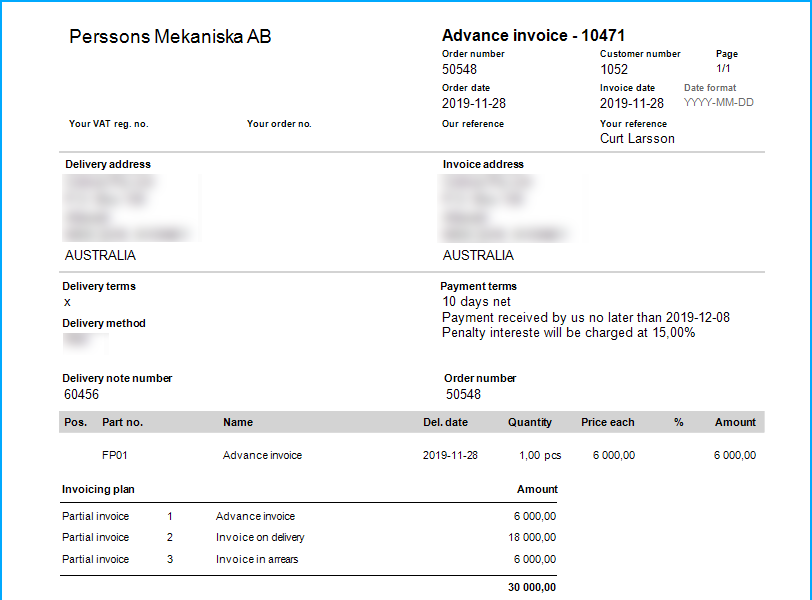
-
You can approve and print the invoice directly or approve it at a later time (for example via Review/Approve invoice).
To release the advance invoice via list type Detailed in the Invoicing plan list, you do the following:
- Mark Include for the advance and in arrears invoice rows in the list that you want to invoice,
- Click the Release for invoicing button
 .
. - After this you will be linked to the Review/Approve invoice procedure, to review the invoices which have been created and then send them to the customers.