Print fixed assets journal
In this procedure you can print journals regarding depreciation and the postings. The journals can be reviewed and then approved. They are then transferred to the accounting. In many cases companies also make a printout of the journal/accounting order and put it in the voucher binder.
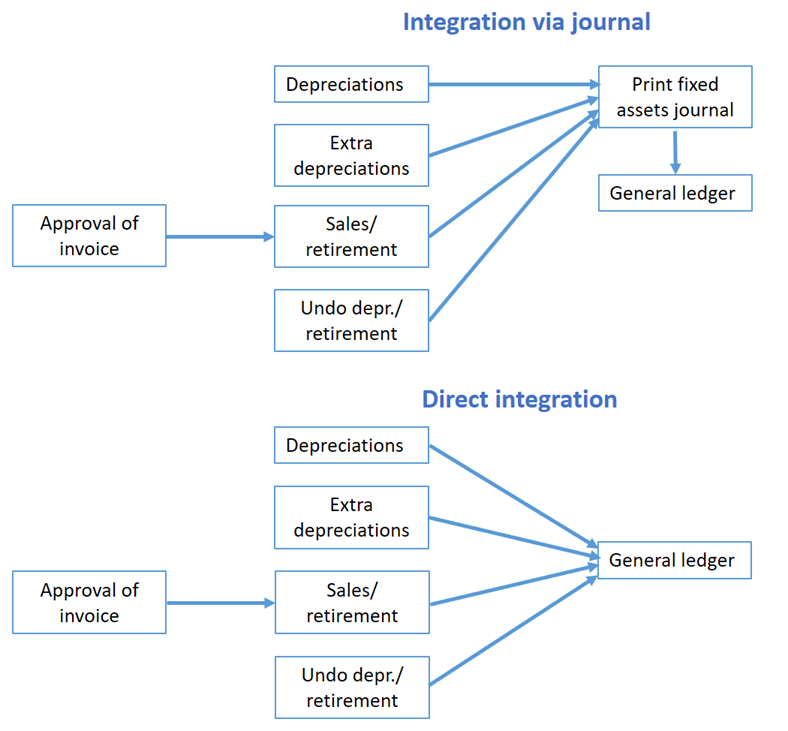
You only need to use this procedure if you apply integration to the accounting via printout of journals. A setting for this is configured in the Voucher number series/Journals procedure. If you apply direct integration of fixed assets journals, you do not need to print the journal.
New records can be seen in this procedure in connection with depreciation of fixed assets, sales/retirement of fixed assets, or when these events are undone. You also see activation of investment in progress. When you approve the journal the records disappear from the procedure and then they can only be printed again by reprinting the journal.
It is possible to change the posting on rows in the journal before you approve it. However, there are restrictions regarding what can be changed in a posting. For example, you cannot modify rows which in the chart of accounts are marked as Blocked for manual postings.
The lists in this procedure have a journal which show the posting in detail per record, and below it there is a summary showing the posting total per account string. The journal creates an automatic break per day and per voucher text.
You can approve a journal directly by clicking the Approve button  in the toolbar of the procedure. Another alternative is to first print the journal and then approve the journal in the dialog which opens. When you approve the journal, vouchers will be created in the accounting. There is a check which makes sure the periods and the voucher number series are open, otherwise you will not be approve the journals.
 List types
Fixed assets journal
By using this list type you can select and load fixed assets journals for approval and printing.
Reprint – Fixed assets journal
With this list type you can reprint fixed assets journals. When you have approved the journals they disappear from the procedure and can only be printed again by using this list type.
Selection rows
In a list procedure there is always a tab called Selection where you can select data records in different intervals from the database. The data records are then loaded by using the Load button  in the toolbar of the procedure.
Under Selection rows in the backstage of the procedure, you can choose which selection rows that each list type should have, under the Selection tab in the procedure. In the List type field you select for which list type you want to customize the selection rows.
One table shows selection rows possible to select and one one table shows the selected selection rows. You can add, delete, or move selection rows by dragging and dropping the selection rows with your mouse pointer.
Using the Save button  you save the selected selection rows.
Read more about this in the Selection topic.