Installation
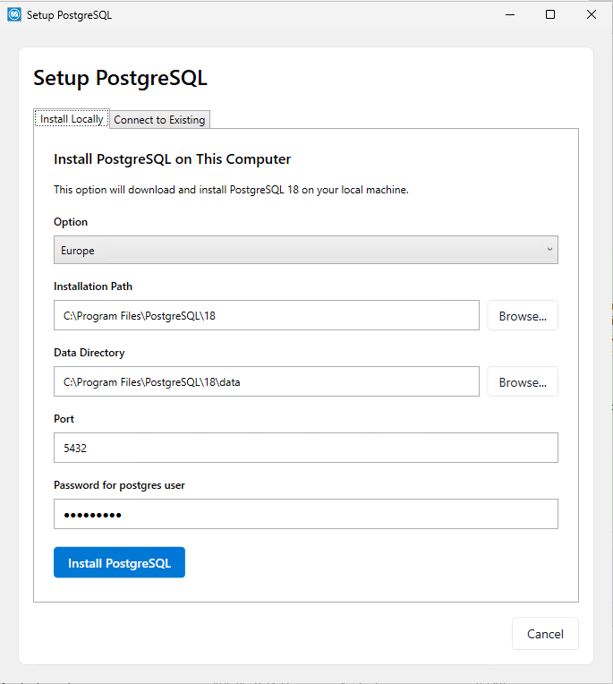
Install locally
- Region: Select the region closest to you.
-
Installation Path: This is the path where PostgreSQL will be installed.
-
Data Directory: This is the data directory for PostgreSQL.
-
Port: The PostgreSQL server port. The default value is 5432.
-
Password for the database superuser (postgres): The password for the PostgreSQL user account.
Store the password in a secure location. This password is required when connecting to your databases. You are solely responsible for storing the password, as Monitor does not save it.
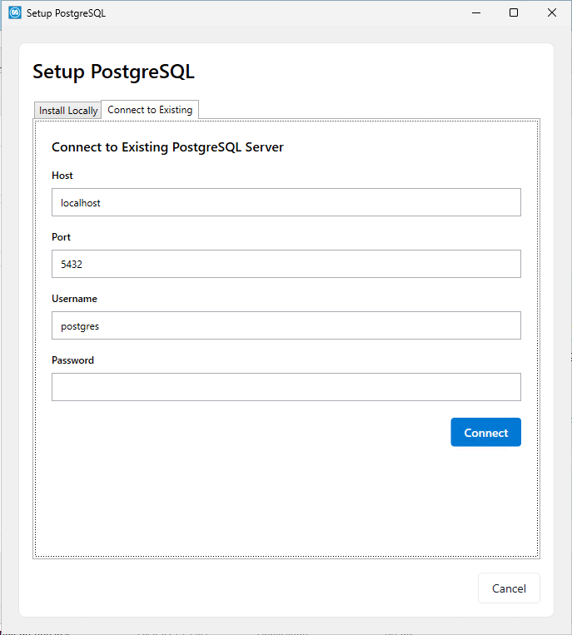
Connect to an existing PostgreSQL server
-
Host: The hostname of the PostgreSQL server.
-
Port: The port of the PostgreSQL server. The default is 5432.
If you already have a PostgreSQL installation for Monitor BI, we recommend changing the PostgreSQL port for Monitor BI so that Monitor ERP can use the default port.
-
Username: The name of the user to connect with. The default is “postgres”.
-
Password: Password of that user.
PostgreSQL Configuration
After PostgreSQL is installed, an automatic configuration is applied to optimize PostgreSQL for your system. You can also run this manually later by starting Monitor.PostgresConfigurationManager.exe from the Monitor server folder, or by opening it in Monitor under Database Administration on the PostgreSQL configuration tab. More information is available in the Monitor PostgreSQL installation and configuration material. (Read more).