Method used for posting of flow
The posting is made based on different logs in the system. In the Stock accounting Stock accounting is a standard feature in Monitor ERP. It is used to continuously post all stock transactions in the system. This way the stock value in the Stock module matches the recorded value in the Accounting module. Changes in stock which are due to changed standard prices, direct stock reporting, arrivals and deliveries, stock count differences, nonconformities (cases), etc. will automatically be posted and give a better understanding of changes in stock and the company's gross profit margin in the income statement., all stock transactions are posted. The posting is made based on these logs:
- Stock transaction log (stock transactions)
- Price change log (adjusting stock value/WIP value due to new standard prices)
- Manufacturing order log (work and subcontract on manufacturing orders)
- Invoicing log (Cost of goods sold (COGS) and income).
In addition to the logs mentioned above, the following is also posted:
- Calculation differences (calculation differences on final reported manufacturing orders)
In the image below, you see how the system posts and records different events. Please note! Management accounting is required for the events highlighted in red.
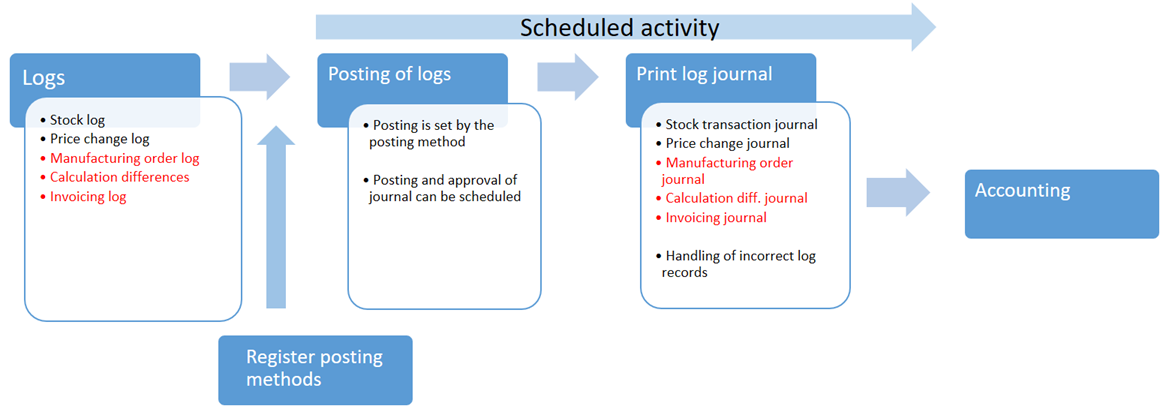
The posting is not made in real time in connection with the reporting but is instead made regularly via a built-in scheduling function. Also the transfer of log journals and their posting to the accounting, can be made automatically via the built-in scheduling function. The scheduling can be set to take place at a specific time or by using fixed intervals (for example every sixth hour or after 10.00 PM each day).
By using posting methods, you predetermine how different transaction types should be posted. This applies to accounts and dimensions, but also to the value on the transactions. The posting methods can also be determined by using other terms. This way you have complete flexibility of how the posting should be made based on different terms such as warehouses, product groups, order types, etc.
Voucher date on the transactions will be set to the same as the Actual reporting date. For example if you report an arrival today but the actual arrival date was yesterday, then you can enter yesterday as Actual arrival date in the Report arrival procedure. The Management accounting will record this by using yesterday's date as voucher date, even though the reporting was made today. In the previous generation of MONITOR, G4, the events were always recorded based on the log date.
The logs on which the postings are based can be seen in the following procedures:
- Stock transaction log
- Price change log
- Manufacturing order log
- Invoicing log
The stock transaction log, price change log, and invoicing log can also be displayed per part in the Part register procedure.