Stock location system
The stock location system ensures that you get a suggested location for the stock transaction. Stock transactions include arrival from purchasing, moving of stock balance and stock reporting from the manufacturing procedures.
The stock location system allows you to register locations and it provides extra system support. Some of the features supported in this stock location system are:
| An overview of the total number of available locations. |
|---|
An overview of vacant and occupied locations.
- An stock analysis that shows the number of locations that are required.
- Vacant locations are suggested for arrivals when you receive arrivals to stock. (To find a suitable vacant location for a particular part, you first need to create putaway strategies which are then linked to the part.)
- The stock location system is a an option sub-module and an option in the Inventory module, and consists of a number of procedures used to configure and maintain the stock location register.
- In the following section we explain how to configure the stock location system.
- Locations need to be generated in order to use the stock location system.
- Work flow when using stock location system
Work flow when starting to use Stock location system:
Generate stock location names for the location register. Use the location coordinates you created in the Basic data With "basic data" we refer to the static records in a database, for example parts, customers, users, work centers, etc. – Stock location system procedure as a template/starting point when you generate locations. The format of the coordinates and the location names will then match.
Import existing location names to the location register.
Set the system setting Check location name to Warn until all location names are registered in the system. After this is done it might be good to change the setting to Block.
Under the Stock tab in the Part register procedure, you select the location for the parts that should have a specific location.
- Please note! On all transactions to stock, a validation of the location name is made.
- The location name can contain a maximum of 35 characters, including separators, if any. In the stock location system you can enter 8 characters per coordinate, however we recommend not exceeding a total of 35 characters so that the location names can be matched with the coordinate system.
- Import existing location names to the location register.
- Set the system setting Check location name to Warn until all location names are registered in the system. After this is done it might be good to change the setting to Block.
- Under the Stock tab in the Part register procedure, you select the location for the parts that should have a specific location.
Please note! On all transactions to stock, a validation of the location name is made.
The location name can contain a maximum of 35 characters, including separators, if any. In Advanced stock management you can enter 8 characters per coordinate, however we recommend not exceeding a total of 35 characters so that the location names can be matched with the coordinate system.
Important to bear in mind
- Naming conventions for coordinates.
- Labeling of location on pallet racks etc.
- The right size for locations and parts.
- The correct quantity/package entered for the parts.
Naming conventions – Advanced stock management
We highly recommend using naming conventions for ALL locations in the warehouse.
Why is it so important?
- To facilitate implementation of putaway strategies.
- Make it easier to sort locations.
- Using consistent names will reduce misunderstandings.
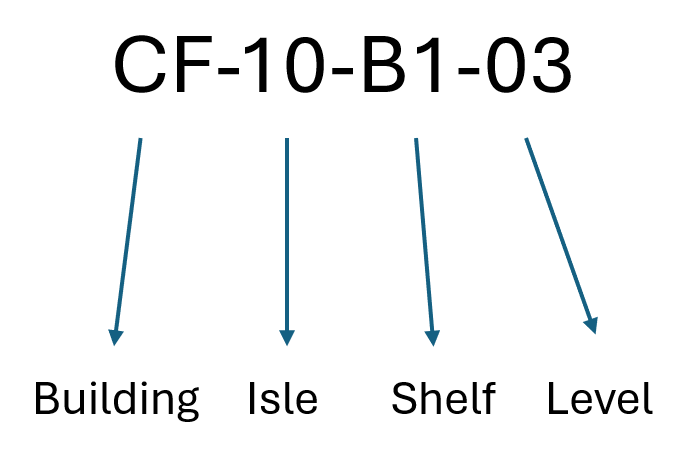
Example of how location names (coordinates) can be constructed.