FAQ – Purchase order and arrivals
 Can I make changes to the price in an arrival reported purchase order?
It is not possible to adjust prices in an arrival reported purchase order. To be able to adjust the price, you need to undo the arrival reporting. Then you can adjust the price in the Register purchase order procedure before a new arrival is reported.
How do I delete a purchase order that is connected to a manufacturing order or a customer order?
Unfortunately you cannot delete the order from the system. Instead you must delete the remaining quantity on the order in the Report arrival procedure by entering 0.00 in Arrival reported quantity, mark Delete remaining and then save.
How do I undo an arrival on a purchase order when the order is linked to accounts payable?
You need to delete the link between accounts payable before you can undo the arrival.
Which list/procedure do I use to see registered/on hand purchase orders in Monitor ERP?
In Order list – Purchase you are able to see purchase orders with status 1, 2 and 5.
How do I create a purchase order from an inquiry?
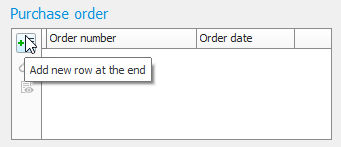
Under the Head tab in Register inquiry in the Purchase order box, click Add new row at the end  to create a purchase order.
How do I determine which language is shown on the documentation that gets sent to the supplier?
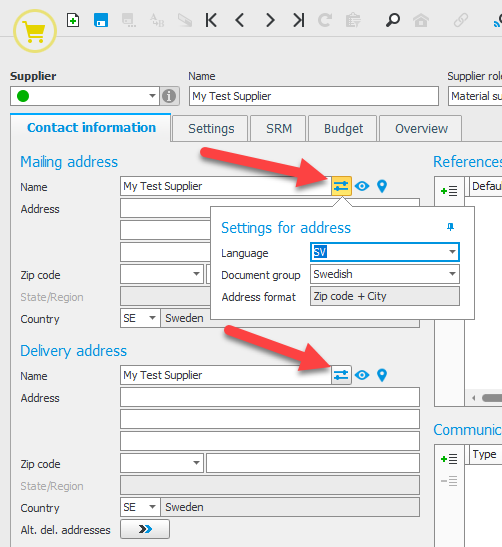
It is the document group that is set on Mailing address and Delivery address under the Settings for address button  (the Contact information tab) in the Supplier register which determines which language the documentation will be in. The same document group must be set on Mailing address and Delivery address for this to apply to the documents.
Can I enter a minimum order value for a purchase for a specific supplier?
Yes, under the Settings tab in Supplier register you can enter a Minimum order value.
How do I register a purchase order for a supplier without having to register the supplier in the Supplier register?
There must always be a supplier registered for a purchase order. One way of solving this is to register a so-called “stray supplier”. Stray supplier A supplier from which you rarely make any purchases. A stray supplier is registered with a supplier number used for one-time purchases from different physical suppliers that you therefore do not want to register in the supplier register. For suppliers marked as stray suppliers, you fill in all the fields on the order instead. is a supplier number used for different suppliers for one-time purchases. This way, these suppliers do not have to be registered in the supplier register. Under the Settings tab under the Miscellaneous heading in the Supplier register procedure, you mark the checkbox called Stray supplier for the supplier you will use for "occasional purchases" or "one-off purchases".
These suppliers do not have to be registered in the supplier register. For suppliers marked as stray suppliers, you fill in all the fields on the order instead. Reminders, if any, for that supplier number will be divided per order, and they will not be gathered in one reminder, as otherwise, when this setting is not selected. That way, you can separate the reminder printouts for the different actual suppliers.