Stock count approval
You can configure that stock count approval should be used in cases where the stock count value falls within a certain range and/or within a certain Percentage of balance. This applies to both positive and negative values. The stock count value is based on the part’s standard price multiplied by the stock count difference.
Please note that, at present, stock count approval can only be applied for stock counts carried out in the Stock count in list procedure. For stock counts carried out in the Stock count there is no support for approval as yet.
General approval settings
In order to approve stock counts, settings must be configured in the Stock count – Approval tab in the General approval settings procedure. Here you add the signers/approvers who will be able to approve stock counts. Each signer/approver you add is linked to a user. You must also set a value range for the signer/approver – that is, stock count values from/to that will trigger approval. You can also enter a Percentage of balance which should trigger the need of approval. The amount interval and the percentage can be used in combination for a signer/approver. Stock count approval will in that case be triggered by whichever term is first met. With this setting you decide if the signer/approver should receive a notification/message in Tasks when there is a stock count that needs approving.
If you have entered both a value interval and a percentage of balance, an approval will be required when a stock count difference falls outside either of these limits.
You can also configure part conditions for the signer/approver. You can set intervals either for part number, part code, product group or ABC ABC codes are used to classify the range of parts by the volumes you sell. The codes are used as a scale for the parts that turn over the most money. The turnover is calculated by multiplying the price of the part by the annual volume. Parts that turn over the most money are called "A-parts", and after that, "B-parts", etc. code (or a combination of these). In cases where a stock count value falls within the specified range for one of these conditions, the selected signer/approver must approve the stock count.

Report stock count
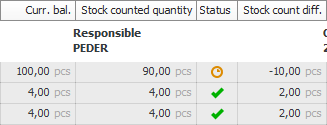
When a user reports a stock count in the Stock count in list procedure, and saves, the Status column indicates if the stock count has been reported or must firstly be approved.
For a reported stock count that does not require approval, a stock transaction is created and the balance is updated as usual. In this case, a green tick appears in the  i Status column. For a reported stock count which must be approved once again, no stock transaction is created and no balance is updated. In this case, the following symbol
  appears in the Status column.
Stock count difference
Reported stock counts that are to be approved are loaded by the approver/signer using the list type Stock count approval, in the Stock count difference procedure.
In the Stock count approval list type you can choose Approve or Reject for the reporting. The list also shows details of the stock count basis, stock counted quantity, stock count difference, balance at reporting, standard price, and value change.

If the signer/approver chooses Approve, and saves, the stock transaction will take place for the stock count and the balance will be updated. If the signer/approver selects Reject, and saves, a stock count request will be created for the part and shown under Stock count in the Stock tab in the Part register.
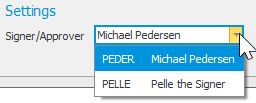
Please note that users with the role of ERP manager or System administrator can always choose to approve instead of the signer/approver in the Stock count difference procedure, for example, if that person is not available at the time. The user can choose themselves as signer/approver in the settings under the Selection tab.
Part register
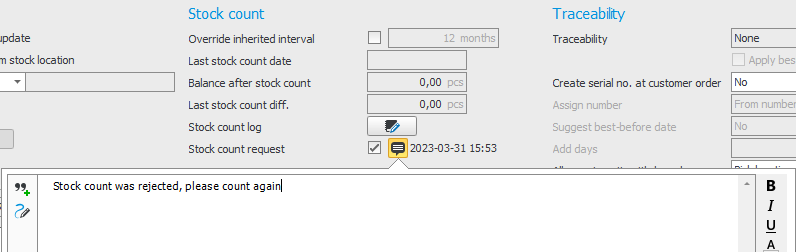
The stock count request for the stock count reporting that was not approved is shown in the Part register, with the time and date when the request was created. A comment indicates that the stock count has not been approved and that the part must be stock counted once again.