Header row
Voucher number series
Here you see the voucher number series for the voucher. Voucher number series must first be created in the procedure Voucher number series/Journals. A default voucher number series can be configured in the Users procedure.
Voucher number
When creating a new voucher, this field is not used. It is not possible to manually enter a new voucher number. It is automatically taken from the voucher number series when you save the voucher. The next available number will then be loaded form the accounting year in which the voucher is recorded (depends on the voucher date). After you save, the procedure goes back to the mode where you can create a new voucher, that is, you will not see the voucher number you just saved in this field. This number is instead shown under the field with the text "Previous voucher number".
You load existing vouchers in the Voucher number field. You can only see and select among the vouchers belonging to the voucher number series you have selected. If you have selected a series which is integrated from accounts payable/accounts receivable, then it is not possible to register new vouchers in that series. Then it is only possible to select which voucher number you want to load. If a selected voucher has the Preliminary checkbox activated, the voucher number is shown in red color.
Voucher date
In this field you see/enter the voucher date. On a new voucher it might be today's date or the date of the most recent voucher. This depends on a system setting (see below).
It is possible to change voucher date for an existing voucher. The date you select is validated against period and accounting year according to below:
- If the date you select belongs to an open period but this is not the current period, then a warning will be displayed saying "The date does not belong to current period".
- If the date you select belongs to a closed period (regardless of accounting year), an error message saying "Invalid date, the period is closed" will be shown.
- If the date you select belongs to an open period in another accounting year, a warning saying "The date belongs to another accounting year" will be displayed. The procedure will also change to that accounting year.
With the system setting Today's date as default voucher date you can decide that today's date will always be suggested. If this system setting is not activated, the date suggested is always the date for the most recently registered voucher in the series you record the voucher.
Voucher text
Here you can enter/select a descriptive text for the voucher with a maximum of 50 characters.
Preliminary
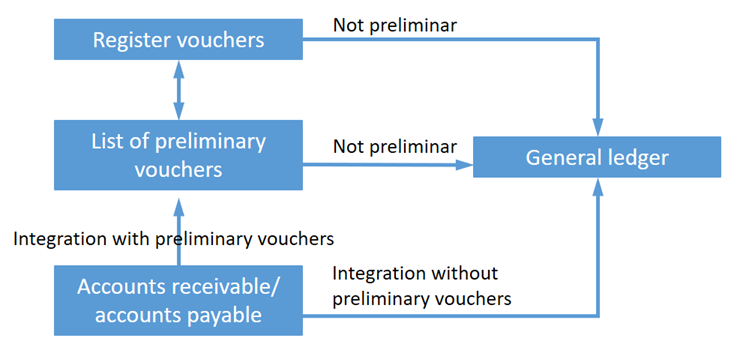
If you load an existing voucher which is preliminary, this checkbox is checked. Preliminary vouchers can be created when vouchers are created from accounts receivable/accounts payable with the integration setting Preliminary. A preliminary voucher can be made final by unchecking this checkbox and save. Not until then will the voucher be included in balances etc. in the balance sheet/income statement, that is, they will be handled as recorded in the system. In a voucher which is recorded, this checkbox is not available, that is, it is not possible to convert an already recorded voucher into being preliminary.
A new manual voucher can be marked as preliminary, for example when a major accounting order has been started but you wish to continue recording it at a later time. You can then check the checkbox and save.
In the list type Preliminary vouchers it is also possible to handle and mass update vouchers to recorded in the Voucher list procedure.
In the image below you see a flow chart for preliminary vouchers.
Previous voucher number
Here you can see the voucher number of the voucher that you have just saved. This is regardless of whether it is a new voucher that you have registered or an existing voucher that you have made changes to.
Next voucher number
When registering a new voucher, the next voucher number in the series will be shown so that you will know in advance which voucher number you are registering. The Next voucher number field is only shown for continuous voucher number series that are not linked to integrated journals relating to customer and supplier invoices.
Please note that the next voucher number does not need to match the actual voucher number that will be assigned to the voucher once you save. This can occur if more than one person is registering in the same voucher number series at the same time.
Automatic posting of VAT
This system setting decides if posting of VAT should take place when you record vouchers concerning purchases and sales liable to VAT. Read more about the function and what is required to use it here. The default value is determined via the system setting called Automatic posting of VAT on voucher registration. The following options are available:
- No – No automatic posting of VAT takes place.
- Yes, post net amount – The system will automatically enter the VAT amount on a separate posting row.
- Yes, post gross amount – The system will re-allocate the posted amount so that the net amount is retained on the posting row, and the VAT amount is posted on a separate row.