Settings
The different settings required to ensure that reporting of Intrastat Intrastat is the system which gathers statistics relating to trade in products within the European Union. Gathering of Intrastat statistics is handled in the same way by all EU member states. works in Monitor ERP are outlined here.
CN code
The basic table with the CN code is registered in the Basic data With "basic data" we refer to the static records in a database, for example parts, customers, users, work centers, etc. – Part procedure. For each code, it is stated if the Weight, Other quantity, or both must be reported.
Certain CN codes must be reported in a quantity other than weight. In these cases, an agreed quantity is to be recorded in the Intrastat report, such as unit, liter, meter, etc. To carry out Intrastat reporting, a unit must be entered for every CN code. In addition, this unit must be registered for the part in the Part register procedure.
Country in Company information
The information used as country of origin is loaded from the Company information procedure, that is, the Country field in the General information about warehouse box. You can also enter Country of origin at part level in the Part register. In this case, the country of origin for parts will override the country entered in the Company information.
The country of origin can be overridden with the setting Use country of origin fr. serial no./batch, if available in the General tab in the Part register, if the part has traceability set on the batch or serial number in the Stock tab.
If one and the same part number is purchased from different countries, and you handle the part for both sales and purchase, the system can use traceability to determine from where a certain part was purchased (the country of origin), in connection with invoicing. In this case, the country comes from the country for the supplier which is linked to the serial number/batch. This country overrides the country entered as the country of origin on the part, or which is specified in the Company information procedure.
Transport mode
The Transport mode is selected in the Terms procedure under the Delivery method tab. Transport mode is used in the Intrastat report.
Transaction types
The transaction types for Intrastat can be found in the Transaction types – Intrastat procedure. The transaction types that can be reported are included in the system. In the table, you can specify which transaction type should be set as default.
Countries
Intrastat applies to trade between EU countries. EU must be checked in the Countries procedure for the countries that belong to the EU, in order for trade between EU countries to be reported correctly in the Instrastat report.
In Intrastat export, the country is obtained from the delivery address on the invoice.
In Intrastat import, the country is obtained from the supplier invoice (which itself comes from the country in the address of the underlying purchase order, if one exists).
For certain countries, you must use a country code other than the standard ISO country code when reporting Intrastat data. The alternative country code is entered in Countries, in the fields Exception country of origin (Intrastat) and Exception country code (Intrastat).
For the purpose of Intrastat reporting in certain countries, there are also the additional country codes: Unknown country (QO), Unknown country, EU (QV), and Unknown country, third country (QW). These can be used to enter Country of origin for parts.
Order types
In the Order types procedure, the Intrastat settings can be accessed via the Intrastat button in the Customer order and Purchase order tabs. The purpose of these settings is as follows:
- To make exceptions for transaction types, depending on the type of order. Import and export of subcontract orders, for example, are assigned the wage processing transaction type. Certain customer orders that refer to returns and replacements may also have a separate transaction type.
- To be able to control the value which must be reported, depending on the order type. The Invoiced price is the normal setting for this, however, in some cases you may need to enter something else. For example, replacements/returns that are invoiced with no price must be reported at the standard price, or that shown on a price list.
By clicking the Intrastat button, you can enter settings relating to transaction types and the value to be recorded in the Intrastat report.

Transaction type
The transaction type is usually left blank. In this case, the transaction type set as default in the Transaction types – Intrastat procedure is reported. If you want to enter an exception for a certain order type, state this transaction type here.
Value to report
The value to be reported for Intrastat is reported here. You can choose between Invoiced price, Standard price, or Price list. For the Subcontract order type, Calculated cost is used for export and Export price + invoiced price for import.
The Calculated cost refers to the WIP value in the manufacturing order, before the subcontract (including the material linked to the subcontract). The value is based on planned costs (pre-calculation).
To check that the calculated cost is correct, you can Save as the part in the BOM and routing procedure in order to create a copy of the part. Then, delete the subcontract and subsequent operations from the copy, and save. Make a pre-calculation for the part copy. The calculated cost in Intrastat should now correspond to the cost that was generated in the pre-calculation. You can then delete the copy of the part.
The Export price + invoiced price refers to the value you report for export (according to this setting) + the price on the supplier invoice.
For import (purchase of material), the Invoiced price is the price stated on the supplier invoice. For suppliers where there is no order link, the invoiced price refers to the price on the purchase order.
Part register
The Export/Import box, in which the weight and CN code are entered, is found in the Part register. This information can also be entered via Part list, List types: Standard, Presentations: General.
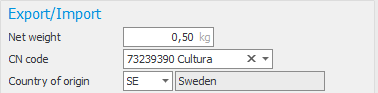
If you enter a CN code for which reporting must take place in a particular unit, a message appears stating this unit is missing for the part:

You can then enter this unit, and the conversion factor for the standard unit, in the Units box.
The CN code can also be entered for parts categorized as Service. Services are normally not included in the Intrastat reports, however, if you have made an active choice to enter a code for services, this is recorded in the report.
The country of origin is used for Intrastat export. The country of origin entered for the part overrides the standard country from which the export is made.
Weight of parts, for wage processing (subcontract)
If the weight must be reported for the goods that are sent for wage processing abroad, the weight must be entered in the subcontract in the BOM and routing procedure. This weight refers to the net weight up until the subcontract (including the material linked to the subcontract).
The field can be accessed under More info in subcontract work. If the subcontract is to be reported in a quantity other than weight, this must be entered under Units for the subcontract part.
Document settings in the Customer register procedure
If the CN code and weight are to be shown on the sales document, this must be activated in the Customer register procedure. This can be done by clicking Document settings in the Settings tab.
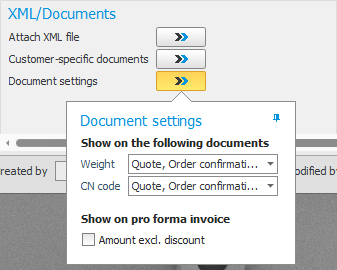
Customer register and Supplier register
Enter VAT registration number for customers and suppliers. If the VAT registration number is missing, you can enter "QV999999999999".
Delivery to an Alternate delivery addresses
If you have Exception VAT registration number for alternative delivery address for the customer in the Customer register, the invoice will be sent to a central invoicing address, but arrival reporting is done in another place and the customer submits a separate VAT registration number for their purchase (often in another country). This allows the VAT registration number to be shown correctly on the customer invoice, intrastat, and EC sales list in these scenarios without needed to register them as separate customers.
Export settings
In order to export Intrastat reports to the relevant authority, you must update the settings under the Export tab in the Settings for import/export procedure.
In Finland, a CSV file is exported to TYVI.